
A free QSpace alternative for Mac
Schnellbild is a free Mac app for the pictures and videos in your folders: open a folder and its thumbnails are there, one key shows a picture large. It plays MKV, AVI and WebM, opens ZIP and RAR archives like folders, and works without an account and without network access.
Schnellbild instead of QSpace?
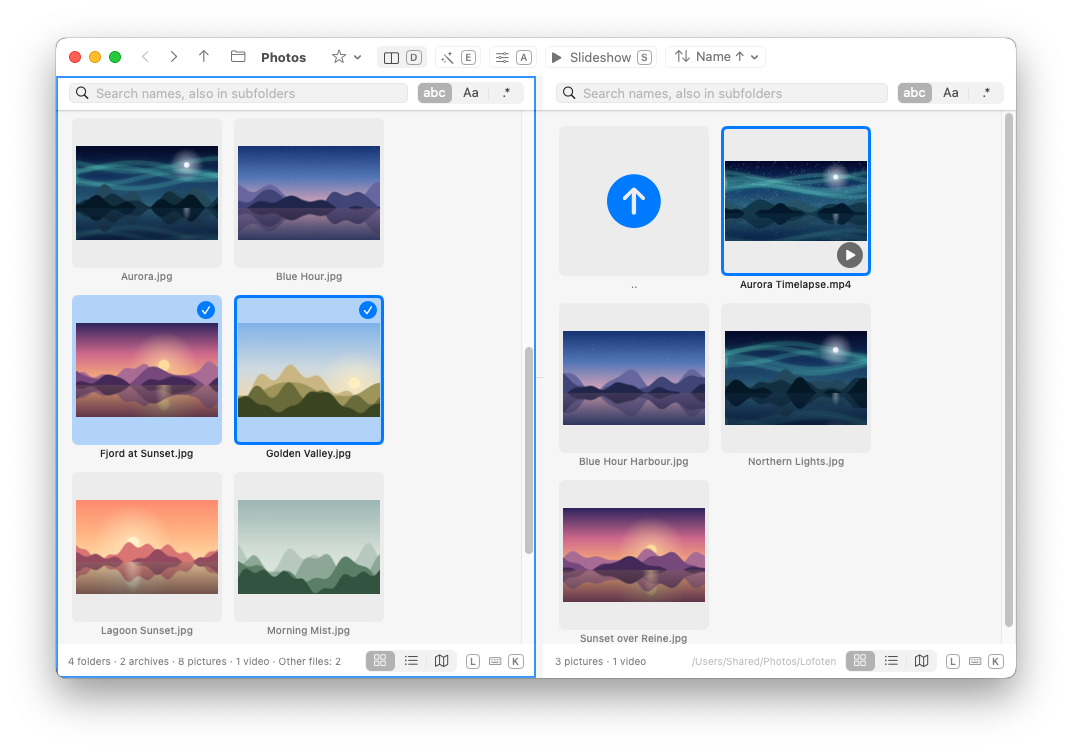
Schnellbild isn't a file manager. It is a viewer with two panes: F5 copies and F6 moves the marked pictures into the other pane, and both can be undone. Schnellbild and QSpace side by side: what each does better, then every feature with a source.
Schnellbild isn't a complete file manager: no FTP, SFTP or cloud connections, no folder sync, no packing of archives. It is made for looking through photos and videos and sorting them: thumbnails of everything, two panes side by side with F5 to copy and F6 to move, archives open like folders.
Where QSpace is stronger
- Up to 12 pane layouts and saved workspaces
- Customization of hotkeys, context menus, toolbar, colors
- Folder sync, file hashes, file templates
- Quick image actions (rotate, convert, remove background)
- Video metadata columns (frame rate, data rate)
Where Schnellbild is stronger
- Free, every feature
- Auto enhance and sliders without changing the file
- Skim videos with the arrow keys
- Open source
- Never goes online
- Finder and Quick Look thumbnails for MKV and more
- Notes a file whose extension doesn't match its content
What QSpace is good at
Finder-like multi-pane file manager with 12 layouts, workspaces, heavy customization (hotkeys, context menu, colors) and regex search. Paid extensions add archive browsing, server/cloud connections and advanced batch rename.
Feature by feature
- Yes
- Partly
- No
- Left out on purpose
- Does not apply
| Feature | Schnellbild | QSpace |
|---|---|---|
| Basics | ||
| Free, every feature | Yes | No1 |
| Open source | Yes | No2 |
| Native on Apple silicon | YesApple silicon only | Yes2 |
| No account, no ads, no tracking | Yes | Partly13Pro license is tied to an account (2 devices); App Store label: Identifiers linked to you |
| Light or dark, apart from the system | Yes | Partly4Colour schemes with light and dark modes (beta); no separate app switch documented |
| Interface in many languages | Yes20 languages | Partly34About 14 languages (EN, ZH-Hans/Hant, NL, FR, DE, HU, IT, JA, KO, PL, RU, ES, TR) |
| Browsing | ||
| Browses folders directly, no import | Yes | Yes2 |
| Thumbnail grid with folder previews | Yes | Yes4 |
| List view with columns | Yes | Yes4 |
| Search names through all subfolders | Yes | Yes5 |
| Search with regular expressions | Yes | Yes5 |
| Quick on network shares and big folders | Yes | Yes4 |
| Several windows | Yes | Yes63 |
| Folder bookmarks | Yes | Yes3 |
| Pictures | ||
| HEIC, AVIF, JPEG XL, WebP | Yes | Partly4Preview through macOS; only HEIC named |
| SVG and PDF | Yes | Yes43 |
| Page through with the keyboard | Yes | Yes4 |
| Zoom, pan, rotate (view only) | Yes | Partly4Quick Look zoom; Rotate action changes the file |
| Slideshow | Yes | Partly47Context menu 'Instant SlideShow' (macOS Quick Look full screen) |
| Auto enhance and sliders without changing the file | Yes | No43 |
| File info: EXIF, codecs, bitrate | Yes | Yes4 |
| Notes a file whose extension doesn't match its content | Yes | No46 |
| Videos | ||
| Plays MP4, MOV | Yes | Yes4 |
| Plays MKV, WebM, AVI, WMV, FLV | Yesbuilt-in VLC engine | Partly4MKV and similar through macOS media extensions |
| Photos and videos together in one grid | Yes | Yes4 |
| Skim videos with the arrow keys | Yes | No4 |
| Loads subtitle files lying next to the video | Left out on purposeReads only the video itself, nothing lying next to it. | No46 |
| Playback speed | Yes | No46 |
| Control bar that stays where you put it | Yes | No46 |
| Playlist | Yesmade on the fly from the slideshow, not saved | No46 |
| Saved playlists | Left out on purposeFolders instead of playlists: the slideshow makes the list. | No46 |
| Picture in Picture | Left out on purposeMade for looking through folders; for watching on the side, a video player fits better. | No46 |
| Audio files, music mode | Left out on purposePictures and videos only; audio files open in their own app. | Partly4Audio cover thumbnails and Quick Look playback only |
| Plays streams and addresses from the internet | Left out on purposeNever goes online, on principle. | No43 |
| Downloads subtitles from the internet | Left out on purposeNever goes online, on principle. | No46 |
| Video adjustments (brightness, contrast …) | Yes | No4 |
| Finder and Quick Look thumbnails for MKV and more | YesMKV, WebM, WMV, FLV, Ogg, VOB | No4 |
| Archives and comics | ||
| ZIP, RAR, 7z open like folders | Yes | Partly813Enhanced Archiver extension (normally $4.99): RAR, ZIP, 7z as folders |
| Comic books CBZ, CBR | Yes | Partly8No comic reader; archive extension list is customizable, so CBZ/CBR could be browsed as archives |
| Password-protected archives | PartlyZIP and RAR; encrypted 7z can't be opened | Yes8 |
| Split archives in several parts | Yes | Yes83 |
| Plays videos straight from archives | Yes | Partly8'Preview in QSpace' option for archives; no player |
| Two-page spread, right-to-left manga mode | Left out on purposeOne picture at a time, as large as the window. | No46 |
| Files | ||
| Rename, trash, new folder | Yes | Yes3 |
| Move and copy by dragging into folders | Yes | Yes9 |
| Two panes side by side (F5 copy, F6 move) | Yes | Partly910Up to 12 panes; copy or move to a pane by your own hotkeys, no F5/F6 by default |
| Undo renames, moves, trash | Yes | Yes4 |
| Edits images (crop, resize, save) | Left out on purposeShows pictures without changing them: your files stay as they are. | Partly34Quick actions: rotate, convert image, remove background, create PDF |
| Batch convert or rename | Left out on purposeConverting and renaming in batches is left to other apps. | Partly34Convert images; Advanced Batch Rename is a paid extension |
| Library, catalog, tags, ratings | Left out on purposeFolders instead of a library: nothing to import. | Partly5Finder tags and comments only |
| Cloud sync, sharing online | Left out on purposeNever goes online, on principle. | Partly31Server Connections extension: FTP, SFTP, Dropbox, OneDrive, Google Drive, S3 … |
| Keyboard | ||
| Everything by keyboard | Yes | Yes11 |
| Your own keyboard shortcuts | Yesfree, with a preset as in Phiewer | Yes1112 |
| Printable cheat sheet of all keys | Yes | No11 |
| Boss key (hide everything at once) | Yes | No46 |
| Safety | ||
| Runs in Apple's App Sandbox | Yes | Partly1312MAS version is sandboxed (folders must be added manually); Pro version uses Full Disk Access |
| Never goes online | Yes | No31 |
| Notarized, provably built from public source | Yes | No2 |
| In the Mac App Store | Partlysoon, €0.99 to support it | Yes312 |
As of November 2026: QSpace Pro 7.0.4 (MAS 7.0.3; beta 7.0.4.018), Schnellbild 0.12. QSpace's column comes from the sources below, Schnellbild's from its README and source code. Left out for lack of a reliable source on QSpace: 6 of 65 features.
Sources
- qspace.awehunt.com/en-us/pricing.html
- qspace.awehunt.com/en-us/index.html
- apps.apple.com/us/app/qspace/id1469774098
- qspace.awehunt.com/en-us/changelog.html
- qspace.awehunt.com/en-us/guide/search.html
- qspace.awehunt.com/en-us/guide.html
- support.apple.com/guide/mac-help/preview-a-file-mh14119/mac
- qspace.awehunt.com/en-us/guide/extension-enhanced-archiver.html
- qspace.awehunt.com/en-us/guide/multi-pane.html
- qspace.awehunt.com/en-us/faq/howto-set-windows-keys.html
- qspace.awehunt.com/en-us/guide/hotkeys.html
- qspace.awehunt.com/en-us/faq/differences-between-mas-and-pro.html
- qspace.awehunt.com/en-us/faq/howto-authorization.html

Try it with your own folders.
Free, no account, every feature included.
Similar alternatives
QSpace is a product of Tian Wenda. All names and trademarks belong to their owners; Schnellbild is not affiliated with them.