
A free Commander One alternative for Mac
Schnellbild is a free Mac app for the pictures and videos in your folders: open a folder and its thumbnails are there, one key shows a picture large. It plays MKV, AVI and WebM, opens ZIP and RAR archives like folders, and works without an account and without network access.
Schnellbild instead of Commander One?
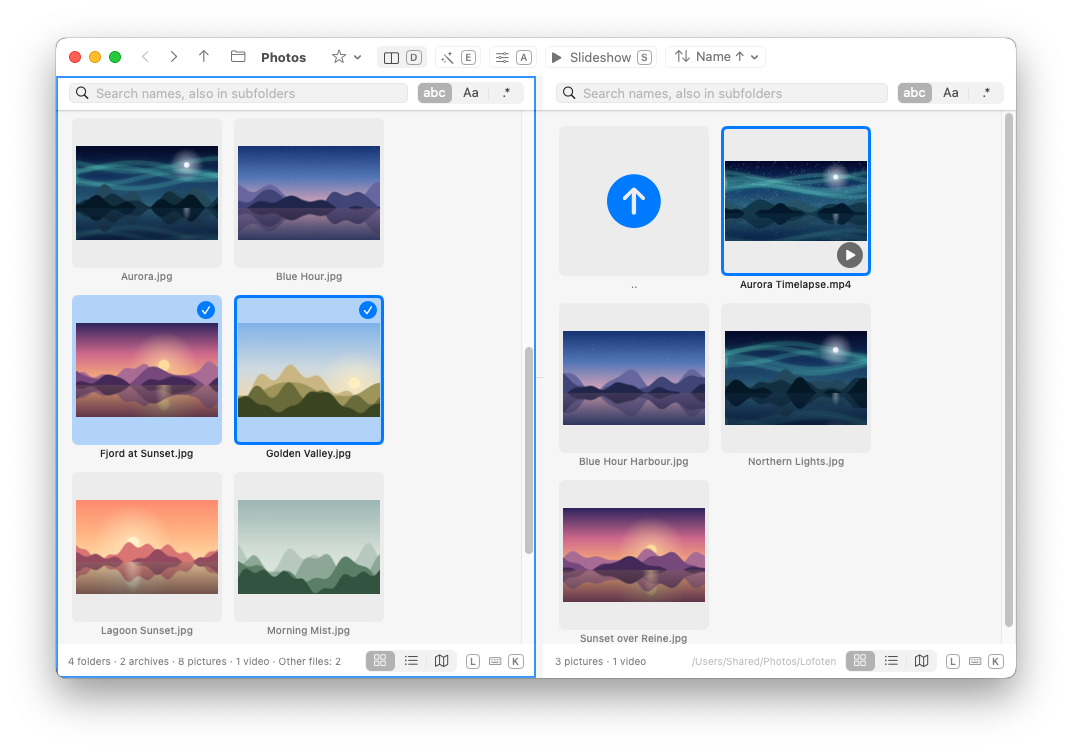
Schnellbild isn't a file manager. It is a viewer with two panes: F5 copies and F6 moves the marked pictures into the other pane, and both can be undone. Schnellbild and Commander One side by side: what each does better, then every feature with a source.
Schnellbild isn't a complete file manager: no FTP, SFTP or cloud connections, no folder sync, no packing of archives. It is made for looking through photos and videos and sorting them: thumbnails of everything, two panes side by side with F5 to copy and F6 to move, archives open like folders.
Where Commander One is stronger
- Classic F-key commander workflow and operations queue
- Regex and content search, also inside archives and on FTP
- PRO: FTP/SFTP and many cloud services, MTP/iOS/Android devices
- Built-in hex/text/binary viewer
- Process viewer, terminal (PRO)
Where Schnellbild is stronger
- Plays MKV, WebM, AVI, WMV, FLV
- Comic books CBZ, CBR
- Slideshow through all subfolders, photos and videos mixed
- Auto enhance and sliders without changing the file
- Skim videos with the arrow keys
- Undo renames, moves, trash
- Open source
What Commander One is good at
Total Commander-style dual-pane file manager for macOS with function-key workflow, regex search, a built-in F3 viewer (text, hex, image, media) and archive handling. The PRO Pack adds RAR/7z, FTP/SFTP, cloud drives, terminal and themes.
Feature by feature
- Yes
- Partly
- No
- Left out on purpose
- Does not apply
| Feature | Schnellbild | Commander One |
|---|---|---|
| Basics | ||
| Free, every feature | Yes | Partly123Free version (dual pane, ZIP only); PRO Pack $29.99, one-time |
| Open source | Yes | No4 |
| Native on Apple silicon | YesApple silicon only | Yes4 |
| No account, no ads, no tracking | Yes | Yes3 |
| Light or dark, apart from the system | Yes | Yes23 |
| Interface in many languages | Yes20 languages | Partly314 languages (CS, NL, EN, FR, DE, HU, IT, JA, KO, PL, PT, ZH, ES, UK); UI language selectable |
| Browsing | ||
| Browses folders directly, no import | Yes | Yes5 |
| Thumbnail grid with folder previews | Yes | Partly32'Thumbs' view mode; no folder preview thumbnails |
| List view with columns | Yes | Yes32 |
| Search names through all subfolders | Yes | Yes2 |
| Search with regular expressions | Yes | Yes23 |
| Quick on network shares and big folders | Yes | Partly36SMB/NetBIOS, FTP, cloud supported; no specific speed claim |
| Several windows | Yes | Yes7 |
| Folder bookmarks | Yes | Yes25 |
| Pictures | ||
| HEIC, AVIF, JPEG XL, WebP | Yes | Partly2Quick Look/built-in viewer image mode with macOS codecs; no dedicated image viewer |
| Camera RAW | Yesthe models macOS knows | Partly28Via image/media viewer modes and Quick Look, i.e. macOS system RAW support; no own decoder |
| Page through with the keyboard | Yes | Partly29Through Quick Look (F3), arrow keys step through the selection |
| Zoom, pan, rotate (view only) | Yes | Partly29Zoom only via Quick Look (Command-Plus/Minus); F3 image mode has no documented zoom |
| Slideshow through all subfolders, photos and videos mixed | Yes | No27 |
| Auto enhance and sliders without changing the file | Yes | No2 |
| File info: EXIF, codecs, bitrate | Yes | Partly2Get Info shows size, dates, permissions; EXIF/codec details not documented |
| Notes a file whose extension doesn't match its content | Yes | Partly2Viewer image mode detects the format by content and shows misnamed images, but does not flag them |
| Videos | ||
| Plays MP4, MOV | Yes | Yes2 |
| Plays MKV, WebM, AVI, WMV, FLV | Yesbuilt-in VLC engine | No2 |
| Photos and videos together in one grid | Yes | Partly105Thumbs view / 'Use thumbs' shows a thumbnail preview for any file; no folder previews |
| Skim videos with the arrow keys | Yes | No29 |
| Playlist | Yesmade on the fly from the slideshow, not saved | No27 |
| Saved playlists | Left out on purposeFolders instead of playlists: the slideshow makes the list. | No27 |
| Audio files, music mode | Left out on purposePictures and videos only; audio files open in their own app. | Partly2Viewer media mode plays audio via Quick Look |
| Plays streams and addresses from the internet | Left out on purposeNever goes online, on principle. | No25 |
| Downloads subtitles from the internet | Left out on purposeNever goes online, on principle. | No27 |
| Video adjustments (brightness, contrast …) | Yes | No27 |
| Finder and Quick Look thumbnails for MKV and more | YesMKV, WebM, WMV, FLV, Ogg, VOB | No257 |
| Archives and comics | ||
| ZIP, RAR, 7z open like folders | Yes | Partly2113Free: ZIP only; PRO ($29.99): 7z, TAR variants read-write, RAR/ISO/XAR read-only |
| Comic books CBZ, CBR | Yes | No11 |
| Password-protected archives | PartlyZIP and RAR; encrypted 7z can't be opened | Yes11 |
| Split archives in several parts | Yes | No211 |
| Plays videos straight from archives | Yes | Partly11Preview files inside archives without extraction (Quick Look), no player |
| Two-page spread, right-to-left manga mode | Left out on purposeOne picture at a time, as large as the window. | No112 |
| Files | ||
| Rename, trash, new folder | Yes | Yes2 |
| Move and copy by dragging into folders | Yes | Yes2 |
| Two panes side by side (F5 copy, F6 move) | Yes | Yes24 |
| Undo renames, moves, trash | Yes | No27 |
| Edits images (crop, resize, save) | Left out on purposeShows pictures without changing them: your files stay as they are. | No2 |
| Batch convert or rename | Left out on purposeConverting and renaming in batches is left to other apps. | No27 |
| Library, catalog, tags, ratings | Left out on purposeFolders instead of a library: nothing to import. | Partly3Finder tags support only |
| Cloud sync, sharing online | Left out on purposeNever goes online, on principle. | Partly312PRO only: Dropbox, Google Drive, OneDrive, S3, WebDAV, FTP/SFTP etc. |
| Keyboard | ||
| Everything by keyboard | Yes | Yes2 |
| Your own keyboard shortcuts | Yesfree, with a preset as in Phiewer | Yes25 |
| Printable cheat sheet of all keys | Yes | Partly2Hotkey list viewable in Preferences; no printable sheet |
| Boss key (hide everything at once) | Yes | No2107 |
| Safety | ||
| Runs in Apple's App Sandbox | Yes | Partly133Mac App Store version is sandboxed (with limits); website PRO version is not |
| Never goes online | Yes | No3 |
| Notarized, provably built from public source | Yes | No4 |
| In the Mac App Store | Partlysoon, €0.99 to support it | Yes312 |
As of November 2026: Commander One 3.18 (4006), Schnellbild 0.12. Commander One's column comes from the sources below, Schnellbild's from its README and source code. Left out for lack of a reliable source on Commander One: 10 of 65 features.
Sources
- commander-one.com/pricing/
- commander-one.com/manual/
- apps.apple.com/us/app/commander-one-file-manager/id1035236694
- commander-one.com/
- commander-one.com/manage-files/
- help.electronic.us/support/solutions/articles/44001773821
- help.electronic.us/support/solutions/articles/44001773821-commander-one-from-the-electronic-team-website
- support.apple.com/en-us/105094
- support.apple.com/guide/mac-help/preview-a-file-mh14119/mac
- help.electronic.us/support/solutions/articles/44001751227-preferences-commander-one
- commander-one.com/manage-archives/
- itunes.apple.com/lookup?id=1035237815
- commander-one.com/mas-vs-site-version-differences/

Try it with your own folders.
Free, no account, every feature included.
Similar alternatives
Commander One is a product of Electronic Team. All names and trademarks belong to their owners; Schnellbild is not affiliated with them.