
ALSee for Mac? Here is the alternative
Schnellbild is a free Mac app for the pictures and videos in your folders: open a folder and its thumbnails are there, one key shows a picture large. It plays MKV, AVI and WebM, opens ZIP and RAR archives like folders, and works without an account and without network access.
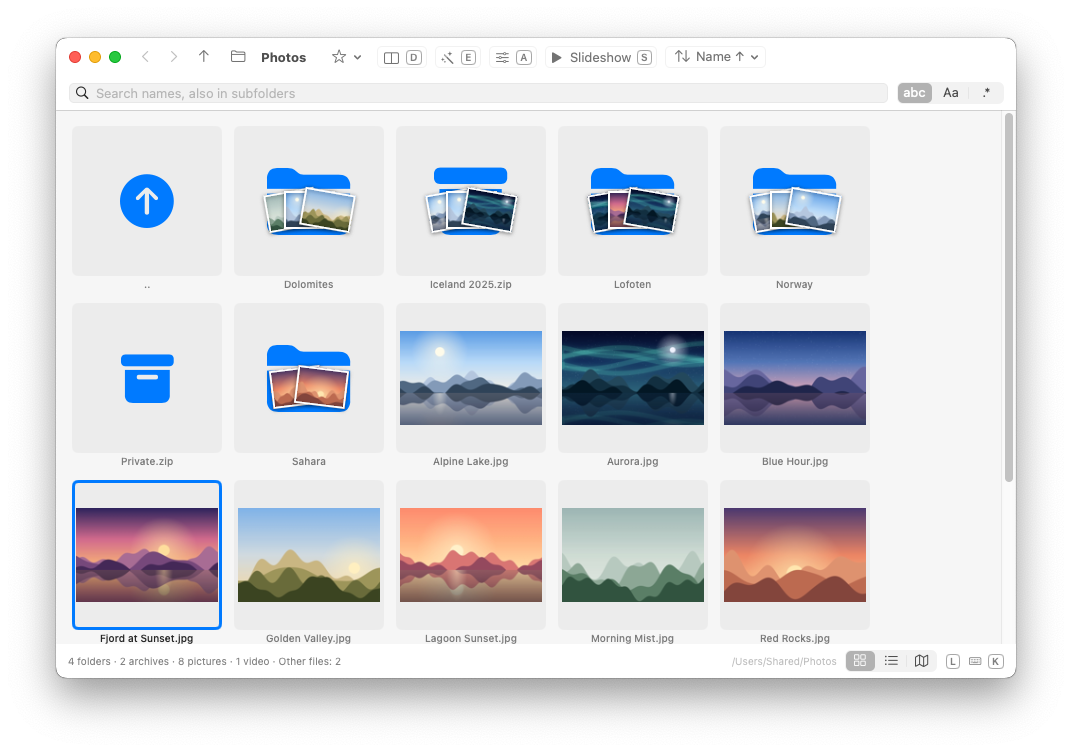
Schnellbild instead of ALSee?
Schnellbild opens a folder straight away, with nothing to import, and you page through its pictures with the arrow keys: HEIC, RAW, PSD, animated GIF and PDF included, with the folder's videos in the same grid. You made it to the Mac. The photos came along, the muscle memory came along, only ALSee stayed behind on the old PC. It doesn't have to stay that way.
What ALSee fans like, and how it works in Schnellbild
- Page through with the keyboard: Space opens a picture, ← → page through the folder.
- Browses folders directly, no import: Open a folder with ⌘O or drop it on the window.
- Thumbnail grid with folder previews: Folders show their first pictures; folders without any are greyed out.
- HEIC, AVIF, JPEG XL, WebP: Through macOS's own ImageIO.
- Animated GIF, PNG, WebP: They play, and zoom and turn like any picture.
- Zoom, pan, rotate (view only): + − or a pinch to zoom, ⌥← ⌥→ to turn; the file stays as it is.
- ZIP, RAR, 7z open like folders: Opened like folders, nothing unpacked to disk.
- Slideshow: S starts it, Space pauses.
Where ALSee stays ahead
- Printing layouts and batch rotate/resize/convert
- AI upscaling, background removal, face mosaic (subscription)
- Integrates with Windows Explorer context menu
Left out on purpose
- Two-page spread, right-to-left manga mode: One picture at a time, as large as the window.
- Edits images (crop, resize, save): Shows pictures without changing them: your files stay as they are.
- Batch convert or rename: Converting and renaming in batches is left to other apps.
What ALSee is good at
ESTsoft's long-standing Korean image viewer from the ALTools family (ALZip, ALYac): thumbnail/list browsing, large and full-screen view, images inside archives, batch convert/resize/rotate, printing, and subscription AI edits (upscaling, background removal, face mosaic).

Try it with your own folders.
Free, no account, every feature included.
Similar alternatives
ALSee (알씨) is a product of ESTsoft. All names and trademarks belong to their owners; Schnellbild is not affiliated with them.