
A free nomacs alternative for Mac
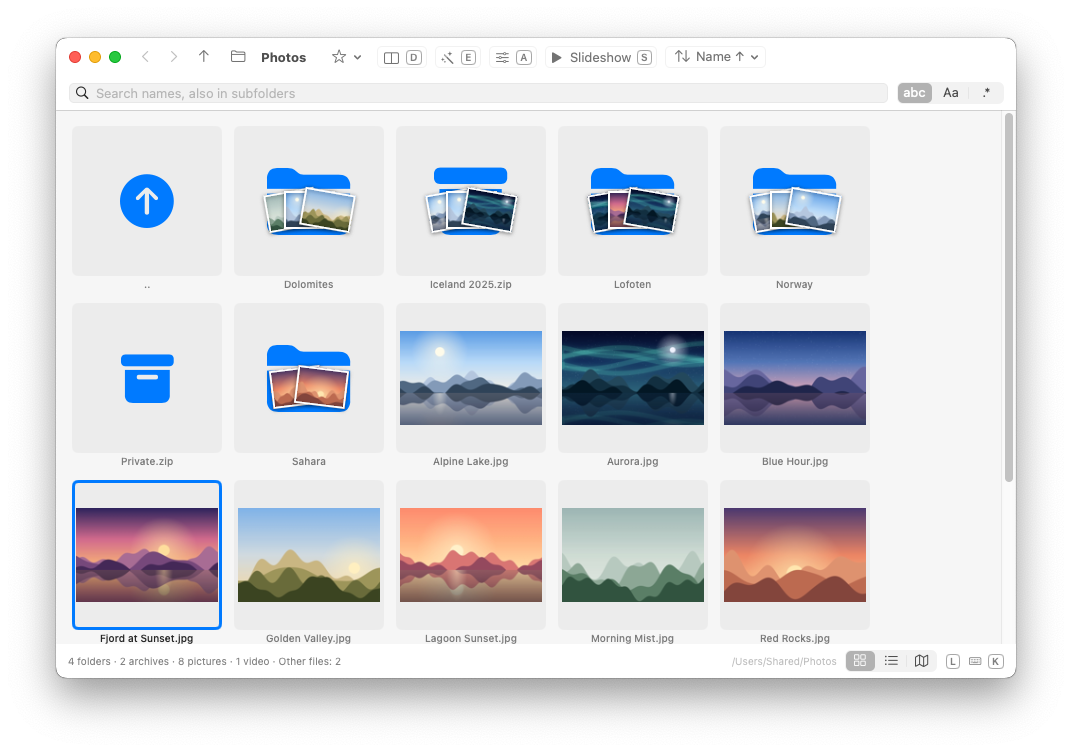
Schnellbild is a free Mac app for the pictures and videos in your folders: open a folder and its thumbnails are there, one key shows a picture large. It plays MKV, AVI and WebM, opens ZIP and RAR archives like folders, and works without an account and without network access.
Schnellbild instead of nomacs?
Schnellbild opens a folder straight away, with nothing to import, and you page through its pictures with the arrow keys: HEIC, RAW, PSD, animated GIF and PDF included, with the folder's videos in the same grid. Schnellbild and nomacs side by side: what each does better, then every feature with a source.
Where nomacs is stronger
- Batch processing and basic image editing
- Synchronise several windows to compare images
- Metadata panels, histogram and star ratings
- Plugins (paint, composite, transforms)
- Runs on Windows, Linux, FreeBSD and Haiku
Where Schnellbild is stronger
- Photos and videos together in one grid
- Plays MKV, WebM, AVI, WMV, FLV
- Plays videos straight from archives
- Skim videos with the arrow keys
- Undo renames, moves, trash
- Never goes online
- Runs in Apple's App Sandbox
What nomacs is good at
nomacs ('Image Lounge') is a free, open-source image viewer with RAW and PSD support, metadata panels, image adjustments and batch processing. A distinctive feature is synchronising several instances to compare images side by side. Current macOS builds exist for Apple silicon and Intel, though they are not notarized.
Feature by feature
- Yes
- Partly
- No
- Left out on purpose
- Does not apply
| Feature | Schnellbild | nomacs |
|---|---|---|
| Basics | ||
| Free, every feature | Yes | Yes1 |
| Open source | Yes | Yes1 |
| Native on Apple silicon | YesApple silicon only | Yes23 |
| No account, no ads, no tracking | Yes | Yes41 |
| Light or dark, apart from the system | Yes | Yes56 |
| Interface in many languages | Yes20 languages | Yes78 |
| Browsing | ||
| Browses folders directly, no import | Yes | Yes9 |
| Thumbnail grid with folder previews | Yes | Partly9Thumbnail strip and thumbnail preview grid of the current folder; no folder previews. |
| List view with columns | Yes | Partly9File explorer dock shows a tree/list with columns; not the main view. |
| Search names through all subfolders | Yes | Partly91011'Find & Filter' searches the loaded file list; with 'Scan Folder Recursive' it covers subfolders. |
| Search with regular expressions | Yes | Yes12 |
| Quick on network shares and big folders | Yes | No1314 |
| Several windows | Yes | Yes92 |
| Folder bookmarks | Yes | No9 |
| Pictures | ||
| HEIC, AVIF, JPEG XL, WebP | Yes | Yes36 |
| Camera RAW | Yesthe models macOS knows | Yes63 |
| PSD, OpenEXR | Yes | Yes61 |
| SVG and PDF | Yes | Partly6SVG yes; no PDF. |
| Animated GIF, PNG, WebP | Yes | Yes69 |
| Page through with the keyboard | Yes | Yes9 |
| Zoom, pan, rotate (view only) | Yes | Yes9 |
| Slideshow | Yes | Yes9 |
| Slideshow through all subfolders, photos and videos mixed | Yes | Partly96'Step through Folder and Sub Folders' for images; no videos. |
| Auto enhance and sliders without changing the file | Yes | Partly91Image adjustments panel (OpenCV); applied as edits that can be saved, not a view-only filter. |
| File info: EXIF, codecs, bitrate | Yes | Yes9 |
| Notes a file whose extension doesn't match its content | Yes | No15 |
| Videos | ||
| Plays MP4, MOV | Yes | No61 |
| Plays MKV, WebM, AVI, WMV, FLV | Yesbuilt-in VLC engine | No61 |
| Photos and videos together in one grid | Yes | No61 |
| Skim videos with the arrow keys | Yes | No61 |
| Subtitles from inside the video | Yes | No61 |
| Loads subtitle files lying next to the video | Left out on purposeReads only the video itself, nothing lying next to it. | No61 |
| Choose the audio track | Yes | No61 |
| Playback speed | Yes | No61 |
| Control bar that stays where you put it | Yes | No61 |
| Playlist | Yesmade on the fly from the slideshow, not saved | No61 |
| Saved playlists | Left out on purposeFolders instead of playlists: the slideshow makes the list. | No61 |
| Picture in Picture | Left out on purposeMade for looking through folders; for watching on the side, a video player fits better. | No61 |
| Audio files, music mode | Left out on purposePictures and videos only; audio files open in their own app. | No61 |
| Plays streams and addresses from the internet | Left out on purposeNever goes online, on principle. | No61 |
| Downloads subtitles from the internet | Left out on purposeNever goes online, on principle. | No61 |
| Video adjustments (brightness, contrast …) | Yes | No61 |
| Finder and Quick Look thumbnails for MKV and more | YesMKV, WebM, WMV, FLV, Ogg, VOB | No61 |
| Archives and comics | ||
| ZIP, RAR, 7z open like folders | Yes | Partly639ZIP (and CBZ) only, via QuaZip, enabled in the full macOS build; no RAR/7z. |
| Comic books CBZ, CBR | Yes | Partly6CBZ yes, CBR no. |
| Password-protected archives | PartlyZIP and RAR; encrypted 7z can't be opened | No1516 |
| Split archives in several parts | Yes | No16 |
| Plays videos straight from archives | Yes | No6 |
| Two-page spread, right-to-left manga mode | Left out on purposeOne picture at a time, as large as the window. | No9 |
| Files | ||
| Rename, trash, new folder | Yes | Yes9 |
| Move and copy by dragging into folders | Yes | Yes17 |
| Two panes side by side (F5 copy, F6 move) | Yes | Partly9Several synchronised instances side by side for comparing images; no two-pane file manager. |
| Undo renames, moves, trash | Yes | No9 |
| Edits images (crop, resize, save) | Left out on purposeShows pictures without changing them: your files stay as they are. | Yes91 |
| Batch convert or rename | Left out on purposeConverting and renaming in batches is left to other apps. | Yes9 |
| Library, catalog, tags, ratings | Left out on purposeFolders instead of a library: nothing to import. | Partly9Star ratings written to metadata; no catalog database. |
| Cloud sync, sharing online | Left out on purposeNever goes online, on principle. | No9 |
| Keyboard | ||
| Everything by keyboard | Yes | Yes9 |
| Your own keyboard shortcuts | Yesfree, with a preset as in Phiewer | Yes9 |
| Printable cheat sheet of all keys | Yes | No11 |
| Boss key (hide everything at once) | Yes | No9 |
| Safety | ||
| Runs in Apple's App Sandbox | Yes | No18 |
| Never goes online | Yes | No49 |
| Notarized, provably built from public source | Yes | Partly31819Built in public GitHub Actions from source, but only ad-hoc signed, not notarized. |
| In the Mac App Store | Partlysoon, €0.99 to support it | No20 |
As of November 2026: nomacs 3.22.5 (beta 3.23.4), Schnellbild 0.12. nomacs's column comes from the sources below, Schnellbild's from its README and source code.
Sources
- github.com/nomacs/nomacs
- github.com/nomacs/nomacs/releases/tag/3.22.5
- github.com/nomacs/nomacs/blob/master/.github/workflows/macos.yml
- github.com/nomacs/nomacs/blob/master/ImageLounge/src/DkCore/DkUpdater.cpp
- github.com/nomacs/nomacs/tree/master/ImageLounge/src/themes
- github.com/nomacs/nomacs/blob/master/ImageLounge/src/DkCore/DkSettings.cpp
- github.com/nomacs/nomacs/tree/master/ImageLounge/translations
- github.com/nomacs/nomacs/releases/tag/3.22.0
- github.com/nomacs/nomacs/blob/master/ImageLounge/src/DkCore/DkActionManager.cpp
- github.com/nomacs/nomacs/blob/master/ImageLounge/src/DkCore/DkImageLoader.cpp
- github.com/nomacs/nomacs/blob/master/ImageLounge/src/DkGui/DkDialog.cpp
- github.com/nomacs/nomacs/blob/master/ImageLounge/src/DkCore/DkUtils.cpp
- github.com/nomacs/nomacs/issues/1696
- github.com/nomacs/nomacs/issues/1011
- github.com/nomacs/nomacs/blob/master/ImageLounge/src/DkCore/DkBasicLoader.cpp
- github.com/nomacs/nomacs/blob/master/ImageLounge/src/DkCore/DkFileInfo.cpp
- github.com/nomacs/nomacs/blob/master/ImageLounge/src/DkGui/DkThumbsWidgets.cpp
- github.com/nomacs/nomacs/blob/master/ImageLounge/macosx/make-portable.sh
- github.com/nomacs/nomacs/pull/1470
- itunes.apple.com/search?term=nomacs&entity=macSoftware&limit=8

Try it with your own folders.
Free, no account, every feature included.
Similar alternatives
nomacs is a product of the nomacs team. All names and trademarks belong to their owners; Schnellbild is not affiliated with them.