
A free Apple Preview alternative for Mac
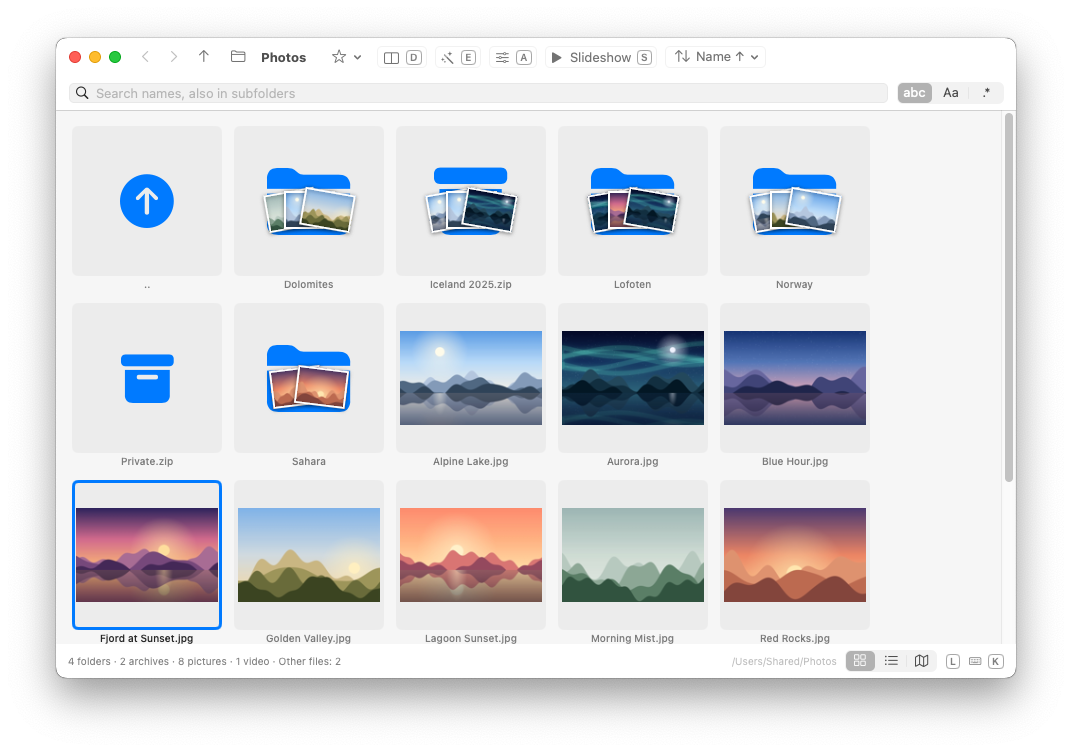
Schnellbild is a free Mac app for the pictures and videos in your folders: open a folder and its thumbnails are there, one key shows a picture large. It plays MKV, AVI and WebM, opens ZIP and RAR archives like folders, and works without an account and without network access.
Schnellbild instead of Apple Preview?
Schnellbild has no library: it shows the photos and videos where they lie on disk, with the date taken and the place from their metadata, and nothing is uploaded. Schnellbild and Apple Preview side by side: what each does better, then every feature with a source.
Where Apple Preview is stronger
- Already installed on every Mac
- Full PDF toolset: annotate, sign forms, combine, password-protect
- Image editing: crop, resize, background removal, batch conversion
- Opens 3D files
Where Schnellbild is stronger
- Browses folders directly, no import
- Photos and videos together in one grid
- Plays MKV, WebM, AVI, WMV, FLV
- ZIP, RAR, 7z open like folders
- Comic books CBZ, CBR
- Plays videos straight from archives
- Two panes side by side (F5 copy, F6 move)
What Apple Preview is good at
Apple's built-in viewer for PDFs and images on every Mac. Strong at PDFs, annotations, signing and quick image fixes like crop, resize and format conversion.
Feature by feature
- Yes
- Partly
- No
- Left out on purpose
- Does not apply
| Feature | Schnellbild | Apple Preview |
|---|---|---|
| Basics | ||
| Free, every feature | Yes | Yes1 |
| Open source | Yes | No1 |
| Native on Apple silicon | YesApple silicon only | Yes1 |
| No account, no ads, no tracking | Yes | Yes2 |
| Light or dark, apart from the system | Yes | No34 |
| Interface in many languages | Yes20 languages | Yes1 |
| Browsing | ||
| Browses folders directly, no import | Yes | No2 |
| Thumbnail grid with folder previews | Yes | Partly5Thumbnails / Contact Sheet of the files or pages opened in one window; no folder previews. |
| List view with columns | Yes | No5 |
| Search names through all subfolders | Yes | No6 |
| Search with regular expressions | Yes | No6 |
| Quick on network shares and big folders | Yes | No2 |
| Several windows | Yes | Yes27 |
| Folder bookmarks | Yes | No8 |
| Pictures | ||
| HEIC, AVIF, JPEG XL, WebP | Yes | Yes910 |
| Camera RAW | Yesthe models macOS knows | Yes11 |
| PSD, OpenEXR | Yes | Yes10 |
| SVG and PDF | Yes | Partly5PDF is Preview's core format; SVG support not documented in the guide (ImageIO reads SVG locally). |
| Animated GIF, PNG, WebP | Yes | Partly12Shows the frames of an animated GIF as stills; Apple points to Quick Look to play it. |
| Page through with the keyboard | Yes | Yes7 |
| Zoom, pan, rotate (view only) | Yes | Yes513 |
| Slideshow | Yes | Partly14Guide documents slideshow for the pages of a PDF. |
| Slideshow through all subfolders, photos and videos mixed | Yes | No14 |
| Auto enhance and sliders without changing the file | Yes | No1315 |
| File info: EXIF, codecs, bitrate | Yes | Yes16 |
| Notes a file whose extension doesn't match its content | Yes | No16 |
| Videos | ||
| Plays MP4, MOV | Yes | No17 |
| Plays MKV, WebM, AVI, WMV, FLV | Yesbuilt-in VLC engine | No17 |
| Photos and videos together in one grid | Yes | No17 |
| Skim videos with the arrow keys | Yes | No17 |
| Subtitles from inside the video | Yes | No17 |
| Loads subtitle files lying next to the video | Left out on purposeReads only the video itself, nothing lying next to it. | No17 |
| Choose the audio track | Yes | No17 |
| Playback speed | Yes | No17 |
| Control bar that stays where you put it | Yes | No17 |
| Playlist | Yesmade on the fly from the slideshow, not saved | No17 |
| Saved playlists | Left out on purposeFolders instead of playlists: the slideshow makes the list. | No17 |
| Picture in Picture | Left out on purposeMade for looking through folders; for watching on the side, a video player fits better. | No17 |
| Audio files, music mode | Left out on purposePictures and videos only; audio files open in their own app. | No17 |
| Plays streams and addresses from the internet | Left out on purposeNever goes online, on principle. | No17 |
| Downloads subtitles from the internet | Left out on purposeNever goes online, on principle. | No17 |
| Video adjustments (brightness, contrast …) | Yes | No17 |
| Finder and Quick Look thumbnails for MKV and more | YesMKV, WebM, WMV, FLV, Ogg, VOB | No17 |
| Archives and comics | ||
| ZIP, RAR, 7z open like folders | Yes | No172 |
| Comic books CBZ, CBR | Yes | No17 |
| Password-protected archives | PartlyZIP and RAR; encrypted 7z can't be opened | No17 |
| Split archives in several parts | Yes | No17 |
| Plays videos straight from archives | Yes | No17 |
| Two-page spread, right-to-left manga mode | Left out on purposeOne picture at a time, as large as the window. | Partly5Two Pages view for PDFs; no right-to-left mode. |
| Files | ||
| Rename, trash, new folder | Yes | Partly15Renames or moves the open file from the window title; no trash or new folder. |
| Move and copy by dragging into folders | Yes | Partly1815Duplicate or Export the open file, move it via the title; no folder file management. |
| Two panes side by side (F5 copy, F6 move) | Yes | No517 |
| Undo renames, moves, trash | Yes | No19 |
| Edits images (crop, resize, save) | Left out on purposeShows pictures without changing them: your files stay as they are. | Yes13 |
| Batch convert or rename | Left out on purposeConverting and renaming in batches is left to other apps. | Yes1013 |
| Library, catalog, tags, ratings | Left out on purposeFolders instead of a library: nothing to import. | No16 |
| Cloud sync, sharing online | Left out on purposeNever goes online, on principle. | Partly2Opens and saves documents in iCloud Drive. |
| Keyboard | ||
| Everything by keyboard | Yes | Partly7Many shortcuts, but no folder navigation by keyboard. |
| Your own keyboard shortcuts | Yesfree, with a preset as in Phiewer | Partly20macOS App Shortcuts can rebind menu commands of any app. |
| Printable cheat sheet of all keys | Yes | Yes7 |
| Boss key (hide everything at once) | Yes | Partly21Only the system-wide Command-H (hide app); no dedicated boss key. |
| Safety | ||
| Runs in Apple's App Sandbox | Yes | Yes1 |
| Never goes online | Yes | Yes1 |
| Notarized, provably built from public source | Yes | No1 |
| In the Mac App Store | Partlysoon, €0.99 to support it | No1 |
As of November 2026: Apple Preview Preview 11.0 on macOS Golden Gate 27.2.1, Schnellbild 0.12. Apple Preview's column comes from the sources below, Schnellbild's from its README and source code.
Sources
- apple.com/macos/feature-availability/
- support.apple.com/guide/preview/open-pdfs-and-images-prvw81f73d4e/mac
- support.apple.com/guide/preview/change-preview-settings-prvw5518ecc0/mac
- support.apple.com/guide/mac-help/use-a-light-or-dark-appearance-mchl52e1c2d2/mac
- support.apple.com/guide/preview/view-pdfs-and-images-prvw11470/mac
- support.apple.com/guide/preview/find-text-in-pdfs-prvw2014/mac
- support.apple.com/guide/preview/keyboard-shortcuts-cpprvw0003/mac
- support.apple.com/guide/preview/bookmark-pdf-pages-prvw1087/mac
- en.wikipedia.org/wiki/JPEG_XL
- support.apple.com/guide/preview/convert-image-file-types-prvw1012/mac
- support.apple.com/en-us/105094
- support.apple.com/guide/preview/view-an-animated-gifs-frames-prvw1016/mac
- support.apple.com/guide/preview/crop-resize-or-rotate-an-image-prvw2015/mac
- support.apple.com/guide/preview/display-a-pdf-as-a-slideshow-prvw3b268798/mac
- support.apple.com/guide/preview/save-files-prvw0b1e8d9e/mac
- support.apple.com/guide/preview/view-information-about-pdfs-and-images-prvw9c94f0a4/mac
- support.apple.com/guide/preview/welcome/mac
- support.apple.com/guide/preview/copy-pdfs-and-images-prvw98091ede/mac
- support.apple.com/guide/preview/revert-changes-to-pdfs-and-images-prvwf4697c5a/mac
- support.apple.com/guide/mac-help/mchlp2271/mac
- support.apple.com/en-us/102650

Try it with your own folders.
Free, no account, every feature included.
Similar alternatives
Apple Preview is a product of Apple. All names and trademarks belong to their owners; Schnellbild is not affiliated with them.